# 15.4 写一个简单的网页应用
下边的程序在端口 `8088` 上启动了一个网页服务器;`SimpleServer()` 会处理 url/`test1` 使它在浏览器输出 `hello world`。`FormServer` 会处理 url/`test2`:如果 url 最初由浏览器请求,那么它是一个 `GET` 请求,返回一个 `form` 常量,包含了简单的 `input` 表单,这个表单里有一个文本框和一个提交按钮。当在文本框输入一些东西并点击提交按钮的时候,会发起一个 POST 请求。`FormServer()` 中的代码用到了 `switch` 来区分两种情况。请求为 POST 类型时,`name` 属性为 `inp` 的文本框的内容可以这样获取:`request.FormValue("inp")`。然后将其写回浏览器页面中。在控制台启动程序,然后到浏览器中打开 url `http://localhost:8088/test2` 来测试这个程序:
示例 15.10 [simple_webserver.go](examples/chapter_15/simple_webserver.go)
```go
package main
import (
"io"
"net/http"
)
const form = `
`
/* handle a simple get request */
func SimpleServer(w http.ResponseWriter, request *http.Request) {
io.WriteString(w, "hello, world
")
}
func FormServer(w http.ResponseWriter, request *http.Request) {
w.Header().Set("Content-Type", "text/html")
switch request.Method {
case "GET":
/* display the form to the user */
io.WriteString(w, form)
case "POST":
/* handle the form data, note that ParseForm must
be called before we can extract form data */
//request.ParseForm();
//io.WriteString(w, request.Form["in"][0])
io.WriteString(w, request.FormValue("in"))
}
}
func main() {
http.HandleFunc("/test1", SimpleServer)
http.HandleFunc("/test2", FormServer)
if err := http.ListenAndServe(":8088", nil); err != nil {
panic(err)
}
}
```
注:当使用字符串常量表示 html 文本的时候,包含 `...` 对于让浏览器将它识别为 html 文档非常重要。
更安全的做法是在处理函数中,在写入返回内容之前将头部的 `content-type` 设置为 `text/html`:`w.Header().Set("Content-Type", "text/html")`。
`"Content-Type"` 会让浏览器认为它可以使用函数 `http.DetectContentType([]byte(form))` 来处理收到的数据。
练习 15.6 [statistics.go](exercises/chapter_15/statistics.go)
编写一个网页程序,可以让用户输入一连串的数字。计算出这些数字的均值和中值,并且打印出来,就像下边这张截图一样:
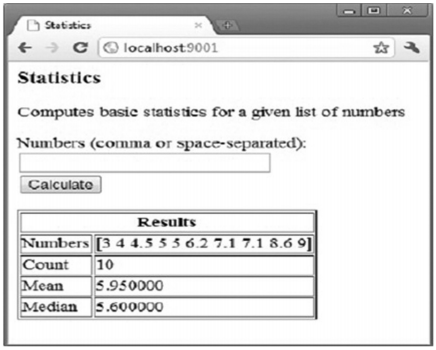 ## 链接
- [目录](directory.md)
- 上一节:[访问并读取页面](15.3.md)
- 下一节:[确保网页应用健壮](15.5.md)
## 链接
- [目录](directory.md)
- 上一节:[访问并读取页面](15.3.md)
- 下一节:[确保网页应用健壮](15.5.md)